Pages

Thursday, April 22, 2010

Zeus Virus: Becoming more powerful

 Zeus virus comes of revision 1.6 with the capability of attacking Firefox and Internet Explorer. A truth that gives a chance for the Google Chrome and Opera users to rejoice. In the 5.5 million computers it has a part in protecting, 1 in each 3000 has become infected. The BBC site informs that not only does Trusteer operate in the U.K, it also is found in the U.S.A.

Zeus is a financial malware.  It infects consumer PCs, waits for them to log onto a list of targeted banks and financial institutions, and then steals their credentials and sends them to a remote server in real time. Additionally, it may inject HTML into the pages rendered by the browser, so that its own content is displayed together (or instead of) the genuine pages from the bank’s web server. Thus, it is able to ask the user to divulge more personal information, such as payment card number and PIN, one time passwords and TANs, etc.


Zues Virus is understood to be the biggest culprit among the family of malware targeting the financial websites and institutions. According to some of the studies, as much as 44% of all financial malware are based upon Zeus. Despite such an alarming state, it is shocking to know that most of the Latest Security Software,  even if they are updated to the latest version,  are incapable of finding and removing Zeus Malware infections. In a recent study by Trusteer, it has been revealed that as much as as 55% of all the tested 10,000 computers, which were equipped with the latest updated security software and antivirus, were not able to detect and remove the traces of Zeus Virus.

The malware steals login information by recording keystrokes when the infected user is on a list of target websites. These websites are usually banks and other financial institutions. The user’s data is then sent to a remote server to be used and sold on by cyber-criminals. “We expect this new version of Zeus to significantly increase fraud losses, since nearly 30% of internet users bank online with Firefox and the infection is growing faster than we have ever seen before,” said Amit Klein, chief technology officer at Trusteer.

For more details on spread of infection visit:  thepcsecurity.com/latest-security-software-cannot-detect-zeus-virus/

Removal:
Run an updated antivirus software capable of detecting Zeus virus. Alternatively an online malware scanner like Trend Micro HouseCall or Windows Live OneCare safety scanner may also be used to scan your system for bot infection. More Online Anti-virus Scanners. Anti-malware softwares like Malware Bytes and Super Anti-Spyware can also be used.


                    Add to Technorati Favorites         Bookmark and Share


Friday, March 26, 2010

Antivirus 2010: Removal

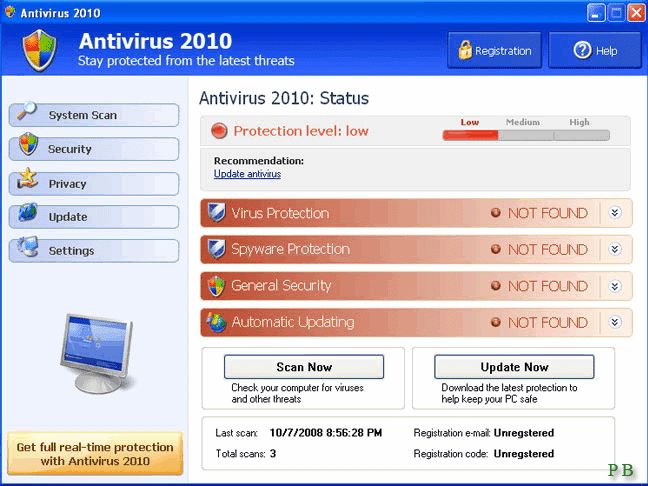
 Antivirus 2010 is a fake antivirus software which may harm your computer if used. It is a cunning malware that uses advertisements to make the user pay for the malware. It displays fake Blue Screen Of Death (BSOD). In the BSOD it shows that windows has detected unregistered version of the Antivirus 2010. It has to be registered for solving the problem. Do not believe this! It is the cunning task of Antivirus 2010. The BSOD displayed by Antivirus 2010 looks like this:


If your computer displays above screen, do not trust it and do not pay for Antivirus 2010 malware.
Screenshot of Antivirus 2010 is shown below:


Symptoms:

  • Changes browser settings
  • Shows commercial adverts
  • Connects itself to the internet
  • Stays resident in background


Removal:

You can remove Antivirus 2010 by using anti malware softwares like
1.  Malware Bytes                       Download
2. Windows Defender                 Download

Manual removal:

You can delete Antivirus 2010 by following the below steps.

1. Kill the process 'AV2010.exe svchost.exe wingamma.exe'
     Help: How to kill the process
2. Remove the following Registry values
     HKEY_CURRENT_USER\Software\AV2010
     HKEY_CLASSES_ROOT\AppID\{3C40236D-990B-443C-90E8-B1C07BCD4A68}
     HKEY_CLASSES_ROOT\AppID\IEDefender.DLL
     HKEY_CLASSES_ROOT\CLSID\{FC8A493F-D236-4653-9A03-2BF4FD94F643}
     HKEY_CLASSES_ROOT\IEDefender.IEDefenderBHO
     HKEY_CLASSES_ROOT\IEDefender.IEDefenderBHO.1
     HKEY_CLASSES_ROOT\Interface\{7BC7565C-5062-43CE-8797-DC2C271140A9}
     HKEY_CLASSES_ROOT\TypeLib\{705FD64B-2B7B-4856-9337-44CA1DA86849}
     HKEY_LOCAL_MACHINE\SOFTWARE\Microsoft\Windows\CurrentVersion\Explorer\Browser  Helper Objects\{FC8A493F-D236-4653-9A03-2BF4FD94F643}
     HKEY_LOCAL_MACHINE\SYSTEM\ControlSet001\Control\Class\{4D36E972-E325-11CE-BFC1-   08002bE10318}\0012
      HKEY_LOCAL_MACHINE\SYSTEM\ControlSet001\Control\Class\{4D36E972-E325-11CE-  BFC1-08002bE10318}\0013
     HKEY_LOCAL_MACHINE\SYSTEM\ControlSet001\Control\Class\{4D36E972-E325-11CE-BFC1-08002bE10318}\0014
     HKEY_LOCAL_MACHINE\SOFTWARE\Microsoft\Windows\CurrentVersion\Run "Windows Gamma Display"


       Help: How to remove registry values

3. Unregister DLLs

     IEDefender.dll
  
      Help: How to unregister malicious dlls

4. Delete files

    Program Files\\AV2010\\AV2010.exe Program Files\\AV2010\\svchost.exe WINDOWS\\system32\\IEDefender.dll WINDOWS\\system32\\wingamma.exe

    Help: How to delete malicious files

5  Delete Directories
     c:\Program Files\AV2010
       c:\Documents and Settings\All Users\Start Menu\Programs\AV2010

                               Add to Technorati Favorites                           Bookmark and Share


Thursday, March 25, 2010

Sality Virus: Symptoms and Removal...

It was two weeks ago a friend of mine gave me his pen drive to copy some of the softwares from my computer to his computer. Since I was in a hurry and trusted my antivirus for my computer's safety, I didn't check for the viruses in the pen drive. After a few minutes I noticed that the icons of anti virus and firewall disappeared. So I tried to run the applications from the start menu, but in vain. Then I tried to run the anti malware program. It also doesn't open. Then I tried to reinstall my anti virus. But it didn't worked. At last I had to format my computer. Then I collected the details about the virus to prevent the future attack. The situation that allowed the virus to enter into my computer were:

  1. My carelessness to disable auto run before inserting pen drive.
  2. Even though the antivirus was powerful to detect and remove Sality virus, it lacks real time protection that enable the virus to over power anti virus.

         Sality is a family of file infecting viruses.It spreads by infecting exe and scr files. The virus also includes an autorun worm component that allows it to spread to any removable drive when connected to a computer. In addition, Sality includes a downloader trojan component that installs additional malware from the internet. Sality  virus have keylogging and back door capabilities. It may infect executable files by prepending its code to host files.

Symptoms of infection:
                                         Sality disables antivirus software and prevents access to certain antivirus and security websites. Sality can also prevent booting into Safe Mode and may delete security-related files found on infected systems. To spread via the autorun component, Sality generally drops a .cmd, .pif, and .exe to the root of discoverable drives, along with an autorun.inf file which contains instructions to load the dropped files when the drive is accessed.

Removal:
                  Try deleting with an anti virus software. If it fails, then remove the hard disk from your computer and connect it to your friends computer and boot into the operating system installed in his computer. Then run the updated anti virus in his system. Anti viruses like avast or BitDefender or Kaspersky or etc can be used. AVG is a bit lame. Repair or delete the viruses found on the scan. Care must be taken not to open any of the drives or files in your hard disk before running the anti virus in your friend's system since it may infect his computer. Then detach the hard disk from his computer and connect it to your computer. Then install a good and updated anti virus with real time protection in order to prevent future infection. Avast provides real time protection and I am satisfied in its functioning. So I am recommending it for your computer.

                  Add to Technorati Favorites               Bookmark and Share